
MyFloorScore Analytics
Make Data Actionable With a Production Score Card
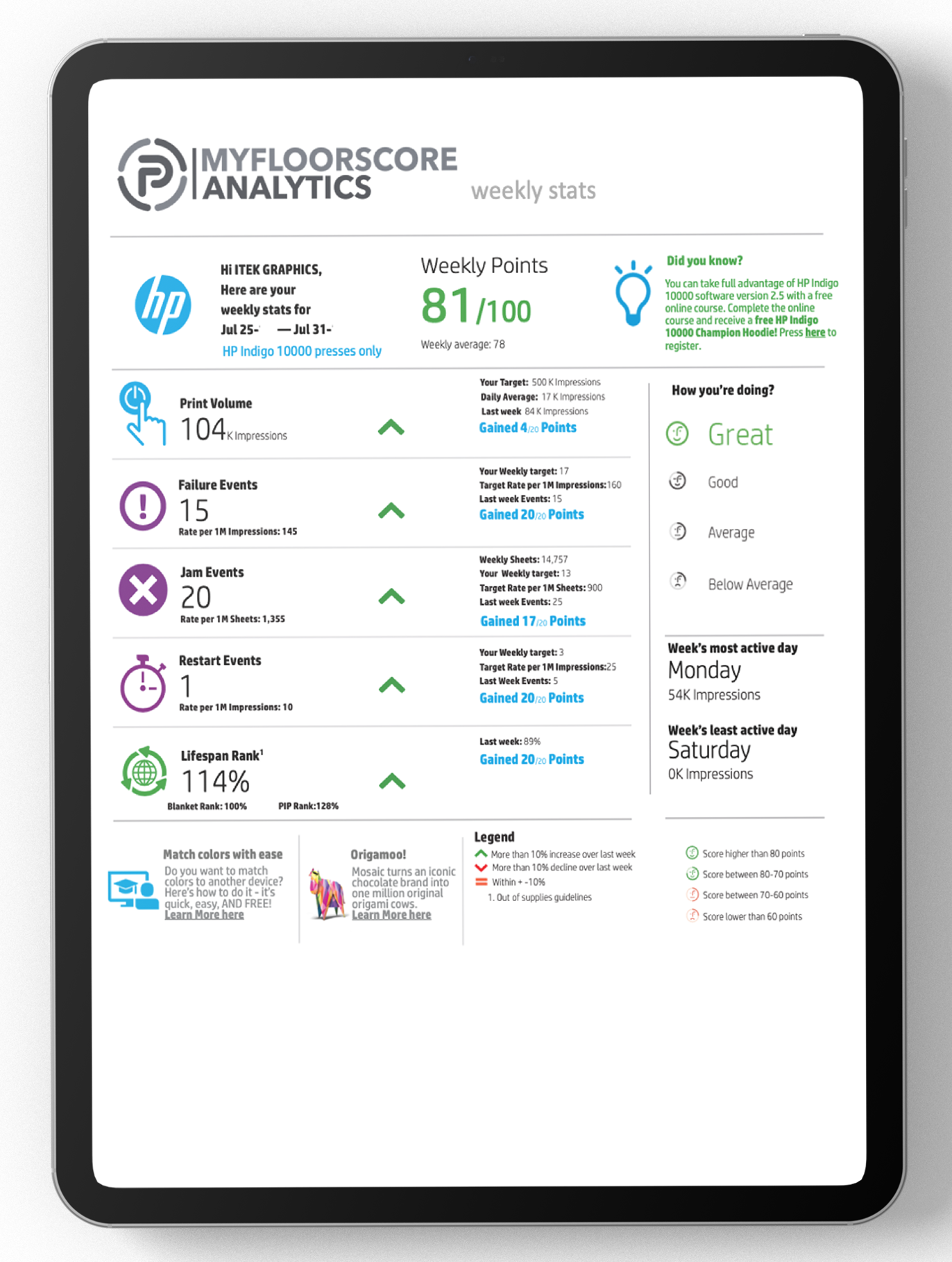
With Production Process Score Cards, you get an easy-to-interpret view that ranks your production, efficiency, and downtime, as well as plant and industry comparisons — tied to your live schedule and shop floor data.
You Set the Criteria
We do the rest
- 1
Connect MyFloorScore to your shop floor production equipment
- 2
Automatically capture and report data every 30 seconds
- 3
Set the criteria to calculate the score and adjust criteria as needed
- 4
Receive an easy-to-interpret scorecard to rank production, efficiency, and downtime, as well as plant and industry comparisons
The Score Card That Makes Your Data Actionable
Accurate Real-Time Production Data
Direct machine connections + operator inputs feed the analytics layer with the truth, in real time. No manual transcription or shift-end paperwork.
- ✓ Machine Status (Running, Down, Issues)
- ✓ Gross counts
- ✓ Net counts
- ✓ Run speed
Industry Comparison Analysis
Compare your operation against peer benchmarks — see where you lead and where there's headroom.
- ✓ Company Score — company overall
- ✓ Plant Score — each plant or division
- ✓ Machine Score — each machine
- ✓ Shift Score — each defined shift
- ✓ Employee Score — each employee
Automatic Score Calculation
Production scores are computed continuously — no spreadsheet babysitting required.
- ✓ Operation Score
- ✓ Waste Score
- ✓ Downtime Score
- ✓ Product Score
- ✓ Material Score
- ✓ Order Score
- ✓ Job Score
- ✓ Sub Job Score
Reporting How You Need It, When You Need It
Configure once, then have the right report in the right inbox automatically.
- ✓ Daily
- ✓ Weekly
- ✓ Monthly
- ✓ Quarterly
- ✓ Annually
How It Works
Collect and Analyze Data
- ✓ Select production priorities and set the importance of conflicting priorities (Speed vs. Waste)
- ✓ Automatically collect or provide the data to measure
- ✓ Proprietary tools analyze your data
Receive Organized Feedback
- ✓ Receive results in Production Process Score Cards
- ✓ Compare your results to others in the industry (their data, but your priorities)
- ✓ View how each score compares to others within your organization and across the industry
Get Results
- ✓ Your team will be measured based on the priorities you set
- ✓ Adjust priorities at any time
- ✓ Track performance over time
- ✓ Make informed decisions with real data
Get Started Today
See how quickly your company can benefit from our easy-to-use MyFloorScore Analytics and make sense of your mountain of production data. Contact us today to put the power of Production Process to work for you.
Schedule a Demo